|
<< Click to Display Table of Contents >> Implementing Counter |
  
|
|
<< Click to Display Table of Contents >> Implementing Counter |
|
This chapter described how you can implement a counter which is then used at the bottom of the PlantBatch dialog.
You just need to add these red line into you Execution Script.
(progn
(setq f (open "[StatusFile]" "w"))
(princ "[DrawingIndex]|[DrawingCount]|[FilePathAndNameExt]" f)
(close f)
)
_OPEN
"[FilePathAndNameExt]"
_.AqaPETUpdateCalculationsDrawing
_.AqaPETUpdateListInDrawing
_.AqaPlUpdateLinksInCurrentDrawing
(command "AUTOPUBLISH" "")
_QSAVE
This would then look like this:
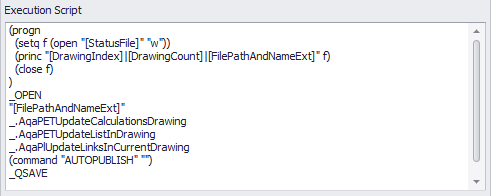
How this appears in PlantBatch can be seen under Main Dialog.
Next Chapter: Command Line